latest articles

1. Visit the NIMC website: http://www.nimc.gov.ng to access the Enrollment Form

2. Fill the Enrollment Form online with all your details and print out a summary sheet with a 2D Barcode and Registration Identification Number.

3. Go to the enrollment center, where an enrollment officer scans the barcode to pull up your information from the database.

4. You should verify and confirm the enrollment data on the system.

5. Your headshot photograph, fingerprints and signature would then be captured.

6. Submit your supporting documents for scanning.

7. Your enrollment is acknowledged where two slips would be given to you. (a) Transaction Slip (b) NIN Slip indicating completion of enrollment.

8. With everything properly done, you should not have any problems getting your identity card quickly.

Supporting Documents
You are required to being along any of the following as a proof of your identity for your enrollment.

1. Old National ID card.

2. Valid Driver’s license.

3. Valid International passport.

4. Voter’s ID card.

5. Govt. staff ID card.

6. State of origin certificate.

7. Birth certificate/declaration of age

Read more

To my free browsing cheat lovers i want to inform you that the Glo Free Browsing Tweak with AnonyTun VPN is released, up and ready to go. Today we are going to make use of a very popular VPN "The AnonyTun VPN", we have also used this VPN to enjoy free browsing on Glo with this popular server "redirect.glo.com" but now its entirely different.

With the AnonyTun VPN on Glo Network, you all can browse for free using any application on your android device such as; Whatsapp, Instagram, Facebook, Twitter, Snapchat and other social media applications you can think of, no browser is exceptional it can aslo be used on all browsers such as; opera mini, UC browser, Mozilla Firefox, Google Chrome and other web browsers. This free browsing cheat/tweak can also be shared through WiFI on your Laptop or with friends so enjoy....

Now back to my topic, before you enjoy this free browsing cheat you must download our VPN of today, the AnonyTun VPN "REBIRTH", After downloading the AnonyTun VPN, kindly follow the configurations settings below to start surfing, downloading and streaming of online videos for free yea i mean for free

Also Read: New Trick That Helps To View Photos in Free Facebook Mode

Download AnonyTun VPN Here From Google Playstore

Or Download From an External Link Here.

Kindly Navigate to your Smartphone/Android Device settings---Mobile Network and configure your Glo Network Settings with a very fast APN to enable high speed connectivity.


Access Point Name:    Glo VPN
Access Point:             176.90.6868.67
Port:                          4430

After downloading AnonyTun VPN application, kindly install and Launch it.

Follow the steps and configuration settings to enjoy free browsing on your Glo Network.


Also Read: (Bonanza) Free Shadowsocks Servers to Start Enjoying Unlimited Browsing on 9mobile.

Launch AnonyTun VPN, Click on Stealth Settings, Turn your Stealth Tunnel ON
AnonyTun VPN Free Browsing Cheat With Glo
Note: The diagram will explain better....
Change your Connection Protocol to HTTP after Turning ON your Stealth Tunnel.
Use 9201/8081/80 as your connection port below the connection protocol.

Disable/Untick Connect VIA Parent Proxy (
Now click on Edit Custom TCP/HTTP Header below VIA Parent Proxy.
Fill in the configuration settings below in the space provided.
URL/Host:               redirect.glo.com
Request Method:     Get
Now Tick "Forward Host", "Keep Alive and "User Agent"
Leave the remaining boxes unticked.

Kindly Click Generate Button and Save.
AnonyTun VPN Free Browsing Cheat With Glo
Minimize your AnonyTun VPN and turn on your data connection, open AnonyTun VPN and select the big connect button to start surfing the internet, downloading, streaming of online videos for free.

Kindly share with friends and don't forget to use the comment box to add contributions and testimonies to our post.
Read more

What happens when your Personal folder in Outlook is lost? You cannot access your emails, attachments, appointments. The corporate communication comes to a halt! But if there is a problem, there has to be a solution. Following article discusses the probable causes and the solutions for outlook personal folder recovery.
Reasons for deletion of Outlook Personal Folder:
There are numerous reasons attributing to the loss of Outlook personal folder but you can recover lost personal folder in Outlook by finding the root cause of the problem and performing the right steps for recovery.
  • When your PST file size has exceeded its data-limit and you are prompted to archive that PST file. But as soon as you start archiving the data, there is a power shutdown in the middle of the process and your machine shuts-down abruptly. The archiving process is also terminated and you end-up proclaiming a corrupt Outlook data. As a result, your mail folder, important emails, appointments and contact lists are lost.
  • MS Outlook’s personal folders may be deleted accidentally. Another such situation is when you accidentally delete your Outlook Personal folder and you are unable to retrieve this folder. Deleted PST file deletes important mails and other communication-related data.
  • Sometimes, during the scanning, the antivirus application installed in the system identifies malware-infected emails or attachments. Antivirus applications scan the folder and delete complete folder even if only one file is infected.
Recover lost Personal Folder in Outlook
You can recover Outlook personal folder with the help of Inbox Repair Tool.
  • Exit Outlook and start Inbox Repair Tool
  • Select the PST from “Browse” and clik on Start Button.“Now Inbox Repair tool will scan and if the problem detected then it asks to start the repair process. Then Click on Repair”
  • When the process gets complete, recover repaired items to a new PST file in Outlook.
In case if you don’t know the location of ScanPST.exe then you can check this Article
Recovering outlook personal folder from the scanpst.exe file is a tedious task and there is no surety if you get the complete data. Secondly, if you miss out a small step, the process is incomplete and the desired results are not achieved after putting time and efforts at the stake.
Alternatives to ScanPST.exe
In case if ScanPST.exe fails to give the result then the best way to recover lost personal folder in Outlook is to download Stellar Phoenix Outlook PST Repair. Onsite reviews help you analyze the relevance of this tool and the satisfaction level achieved by the users.
free download
3-step procedure for Outlook Personal folder Recovery
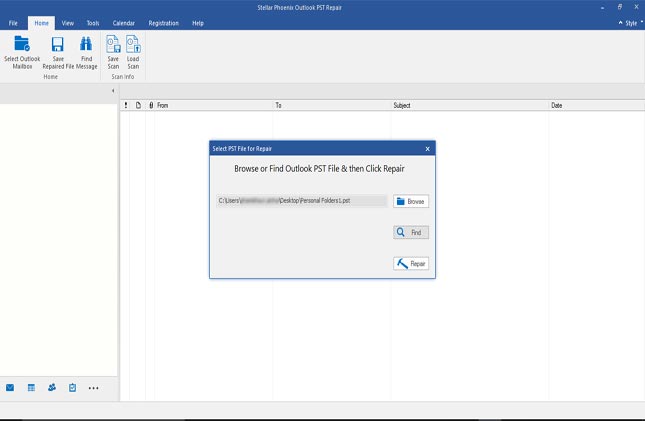
Stellar Phoenix Outlook PST Repair tool helps you to recover lost Personal Folder in Outlook with below-mentioned steps. To recover lost personal folder in Outlook Download, Install and launch the software.

1. Select PST file for Repair prompts you to select PST with Browse and Find Option
“Click on Browse if you    know the location of PST file and in case you are not aware of its location click on Find”  
2. After selecting PST, Click Repair button. Software scans the corrupt PST file. Time of scanning is directly proportional to the size of PST.
3. You will see the preview of Scanned PST. Select Folder, Click “Saved Repaired File” button from the File menu. Select saving format as PST from multiple saving options. Browse the location where you want to save the recovered PST. Click on OK button and your repaired Personal folder in Outlook is saved at the desired location.
To Sum up
Before using any inbuilt utility, it’s important to know its pros and cons. Also, It is advised to backup your PST regularly to avoid loss of data. But don’t worry Downloading Stellar Phoenix Outlook PST Repair helps you find files easily and repairs and saves data in the different location for safety and file security.
Read more

You want to be safe when it comes to Android apps and not waste your money on things you wouldn’t like? Here are ways to spot fake android apps. 
Just because an app is in the Google Play Store does not mean that it is a legitimate app. This is because Google is constantly removing fraudulent apps from the Android marketplace, such as fake antivirus, browsers, and games.
Besides Google Play, and other app markets, there are many other ways that fake apps can get onto your Android device. Scammers will try any means necessary to trick you into installing a fake app.
Criminals use emails and SMS messages that appear to be from your bank, credit card company or other brands to trick people into downloading applications that will compromise their data. Sometimes, fake apps will pose as security updates, and clicking on the links may lead to your information being stolen.
According to community.norton.com, if you are an Android user and you receive an unexpected SMS, a strange alert or notification, or unusual requests from what may seem to be your bank or other familiar brand, beware. Criminals may be trying to rip you off.
What can you do to protect yourself?
Unsolicited texts, emails, or sudden notifications that appear to be from a bank, retailer, or other known institution may not always be what they seem. Use caution with any link delivered to you and always read the message first. Instead of using the link supplied in the message, go directly to the website in question and log into your account the way you would normally. If the message seems particularly worrisome, call the company directly to verify the information before acting online.
Also, only download Android apps from official sources, such as the Google Play Store. Before downloading any app, do some research. Check how many times the app has been downloaded. A wildly popular app is a telltale sign of a good app. Read app reviews, look at the developer, and do a search online. There may be more information coming from other users who have previously been duped. Cybercriminals may try to fool you with fake reviews that are often short and generic, so be sure to check out any other apps made by the developer. The more apps that developer has created, the higher the chance that the developer is the real deal.
Security or software update notifications can be a bit trickier to decipher. Often, users receive a prompt to install an urgent security update. Your best action in this scenario would be to search online to find out information about that update. If there are multiple discussions online about that specific security update, that can confirm if it is genuine.
There are also clear visual things that stick out if you want to identify fake Android apps. Spelling errors, shoddy logos, and unbalanced or poorly formatted interfaces are clues the app may be fake.
Finally, if you want to be completely covered, there are a few options to keep your device safe.
Always remember to think before you click. Even though there may be a sense of urgency to one-click and install, it is better to take the time and remind yourself of all the signs an app may be fake.
An easy protection step everybody should take is to visit your Android settings and make sure you do not allow third-party app downloads from un-trusted sites.

Norton Mobile Security App Advisor for the Google Play Store, which is included in Norton Mobile Security, provides comprehensive, proactive protection from the threats on today’s mobile Internet landscape. The App Advisor allows users to examine the behaviour of an app before actually downloading it to the device. App Advisor scans apps in the Google Play Store looking for features that can invade privacy, display annoying/intrusive behaviour such as pop up ads or excessive battery usage, and unnecessary data usage. It will also detect if an app contains malware or is malicious in nature. 
Read more

Google really does not have full type formally. The word originated from a spelling of the word “googol” which implies , a awfully immense variety - the amount one followed by 100 zero zero 's. however I even have browse somewhere that GOOGLE is AN form for "Global Organization Of adjusted cluster Language Of Earth".   
Google could be a transnational, publicly-traded organization designed round the company's massively well-liked programme. Google's alternative enterprises embrace web analytics, cloud computing, advertising technologies, and net app, browser and software package development. Google is AN yank transnational technology company specializing in Internet-related services and merchandise that embrace on-line advertising technologies, search, cloud computing, software, and hardware.


Google is popularly renowned by it programme and a few different few merchandise however here nowadays, i'll list and make a case for all of Google's created merchandise. Read below...


Products/Platforms created By Google and Their means 

Web

Web Search: net search could be a product by Google to assist you search billions of net-pages. 
Google Chrome: A browser (App) designed for speed, simplicity and security. 
Bookmarks: marker could be a product by Google to assist you Access your bookmarks and asterisked things. 

Business

G Suite: Get email, docs, storage and additional, made-to-order for your business
Adsense: this can be a product by Google to assist you produce on-line revenue. that's turning your passion into profits by monetizing your site's contents (Blogger) or videos(YouTube). 
AdMob: A product to assist build cash from your apps by putting Admob ads on them. 
Digital Skills for continent : Google's product that helps you learn digital business skills at no cost. 

Media 
Books : This product helps you search the total text of books
Image Search : explore for pictures on the net
News : Search thousands of stories stories
Video Search : explore for videos on the net
Google Photos : all of your photos on all of your devices, organized and simple to share. this can be out there on all tecno phones made up of 2015 until date. 
Google Cardboard : expertise video game during a straightforward, fun, and reasonable approach

Geo 
Map : Map as a google product that helps you read maps 
Earth : this can be a google product that helps you explore the planet from your computer/pc or phones 

Specialized Search 
Custom Search : produce a made-to-order search expertise for your community
Scholar : Search bookish papers
Trends : Explore past and gift search trends
Google Flights : realize flights, track costs and book your next destination

Home & workplace 
Gmail: quick, searchable email with less spam
Drive: produce, share and keep all of your stuff in one place
Docs: Open, edit, and build documents
Sheets: Open, edit, and build spreadsheets
Slides: Open, edit, and build displays
Forms: Build free surveys
Drawings: produce diagrams and flow charts
Sites: produce websites and secure cluster wikis
Calendar: Organize your schedule and share events with friends
Translate: Instantly translate text, web pages, and files between over fifty languages
Hangouts: Conversations that return to life. Anytime, anywhere, for free

Social 
Google+: Google's social media platform to get wonderful things, created by fiery folks
Blogger: A blogging platform by google for you to publish your passions, your approach as a blogger. 
Groups: produce mailing lists and discussion teams
Spaces: realize, discuss and do things with friends. 

All these ar the merchandise Google runs while not any of them running down. that means Google is nice, nice works by Google. They extremely conjointly helped folks publish their passion victimisation Blogger  blogging platform and switch the eagerness into profit victimisation AdSense.


Read more

Cheats: Glo bounce: Best | Cheapest Glo Tariff Plan 2016 - Glo Bounce + Overload (Bonus) 

Finally,here comes the Cheapest and Best Tariff Plans for the Glo customers!

Best Glo Tariff Plan 2015: Glo Bounce


Rate: Calls to other Glo Bounce subscribers: 11k/s Other Glo to Glo calls as well as other networks: 15kobo per sec (N9/min) Conditions: N24 first min (Charged only when you make the first call once a day) Usage: 15k/s flat for all networks


How to Migrate to Glo Bounce and Enjoy Cheap Calls


Code to migrate: Dial “*170*4#”

Code to check call balance on Glo: Dial

#124*1#


Bonus

Glo Overload  

Update June 2015 Subscribe to Glo Overload to get additional bonus when you recharge
Features: 2x bonus (100%) for N100 recharge and 3x (200%) for N200 and above
recharge Free 15mb data on every recharge (valid for the day) Free 1 minute for every 3 minutes of call

How to Activate Glo Overload

Code to activate: Dial *200# Code to check overload bonus call balance: Dial #122*7# Conditions: Bonus is only for Glo to Glo calls and charged at 60k/s (N36 per minute). Use between 10pm and 8am. Main account balance charge according to your current tariff plan Enjoy your calls.


Read more

Free! Get Airtel 2.25GB For N500 Only


How To Get Airtel 2.25GB For Just 500 Naira, its almost freeI dont think there is a better package than this on Airtel. 2.25gb for just #500? I am not AIRTEL fan but this one worth trying, just load 500# and dial *390*2*1#. 1.5gb+750mb we aren't sure of this for old customers, It works on new sims only!
Read more